Order by 3:00 PM Monday – Friday to receive your parcel the next day.
Orders placed after 3:00 PM ship the next working day on the same 24‑Hour service and usually arrive the following day.
See Full Delivery Information.
Overview
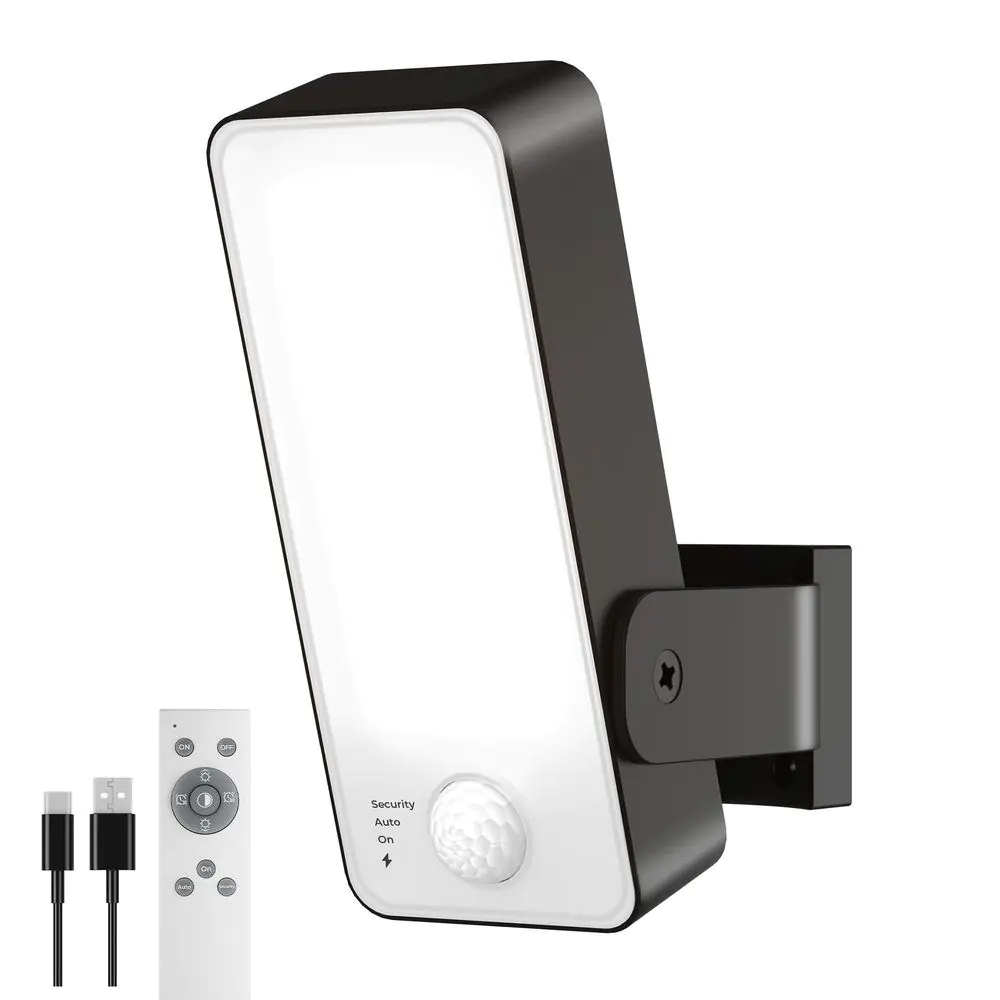
Motion-activated 600 lumen light with its own rechargeable battery, three light colours and a remote. Charges by USB-C, so there is no wiring and no batteries to buy.
Fit the light where you want coverage and charge it from any USB plug: there are no batteries to buy and no cable to run. It gives 600 lumens in warm, natural or cool white, and a remote lets you change the colour, brightness and mode from the ground.
✓ 600 lumens✓ 12000mAh Rechargeable✓ Up to 9 m motion sensing✓ 3 Light Colours✓ Remote Control✓ IP65-rated
An ideal solution for entrances, side alleys, sheds, gardens, or anywhere that needs instant motion-activated lighting. Install in minutes, indoors or outdoors—even far from the mains.
Light over a patio or back door, with no cable to run
Powerful, Reliable, and Weatherproof Lighting
Instant Motion Activation
Auto-ON with a PIR motion sensor covering 120°, up to about 9 metres
Light stays on as long as movement is detected, auto-off about 30 seconds after motion stops
Day/night sensor: in Auto mode it only comes on when it's dark
Three Modes
On: steady light, with a 30 or 60 minute timer on the remote
Auto: off until it detects movement in the dark
Security: flashes red when it detects movement, to warn off visitors
Bright & Adjustable
Delivers 600 lumens from a 4.5W LED panel
Warm (3000K), natural (4000K) or cool white (6000K)
Dims from 10% to 100% for softer light when you need it
Rechargeable Battery
Built-in 12000mAh rechargeable battery: no batteries to buy or replace
Charges by USB-C in about 8 to 10 hours
No mains supply or wiring required
Weatherproof & Adjustable
IP65-rated against rain and dust (maker's rating)
The head tilts 270° and turns 150° to aim the light where you need it
Fast, Simple Installation
Lightweight (about 330 g): screw the base up, slide the light on, done
Perfect for DIYers and renters—no need for an electrician
Warm white for a softer glow, cool white for maximum clarity
Autumn and Winter Use
Because it runs on its own battery rather than a solar panel, it works the same on short, dull winter days. Long nights and more comings and goings mean it's triggered more often, so expect to charge it more frequently in winter than in summer. Lower brightness and warm white help a charge go further.
Common Questions
Does it need wiring or a solar panel?
No. It has a built-in rechargeable battery that you charge with the USB-C cable, so there's no wiring and no solar panel to position.
How do I charge it?
Lift the light off its wall bracket, open the rubber cover on the side and plug in the USB-C cable. A 5V 2A USB plug is recommended (not supplied). A full charge takes about 8 to 10 hours; the indicator shows red while it's charging.
How long does it stay on after it detects movement?
About 30 seconds after the last movement. The time and the sensor sensitivity are fixed, so if it picks up a pavement or road, angle the head further down.
What does Security mode do?
In Security mode the light flashes red when it detects movement, as a warning to anyone approaching.
Can I change the colour and brightness?
Yes. Use the remote or the button on the light to switch between warm, natural and cool white, and to dim it from 10% to 100%. The remote is infrared, so point it at the front of the light.
No wiring and no electrician. It takes a few minutes with a drill and a screwdriver.
1. Charge First
Charge the light fully with the USB-C cable before fitting it. A full charge takes about 8 to 10 hours.
2. Pick the Spot
Choose a firm wall or fence where the sensor can see people coming: over a door, along a side path or on a shed. Fit it out of easy reach, because the light lifts off its bracket for charging.
3. Fix the Bracket
Hold the bracket up with the 'UP' mark at the top, mark the two screw holes, drill and plug them if needed, and screw it on.
4. Slide the Light On
Slide the light onto the bracket until it sits firmly.
5. Aim It
Tilt and turn the head to point the light where you need it. If it picks up a pavement or road, angle it further down.
6. Choose Your Settings
Use the remote or the buttons to pick On, Auto or Security mode, the colour and the brightness, then walk past after dark to check it.