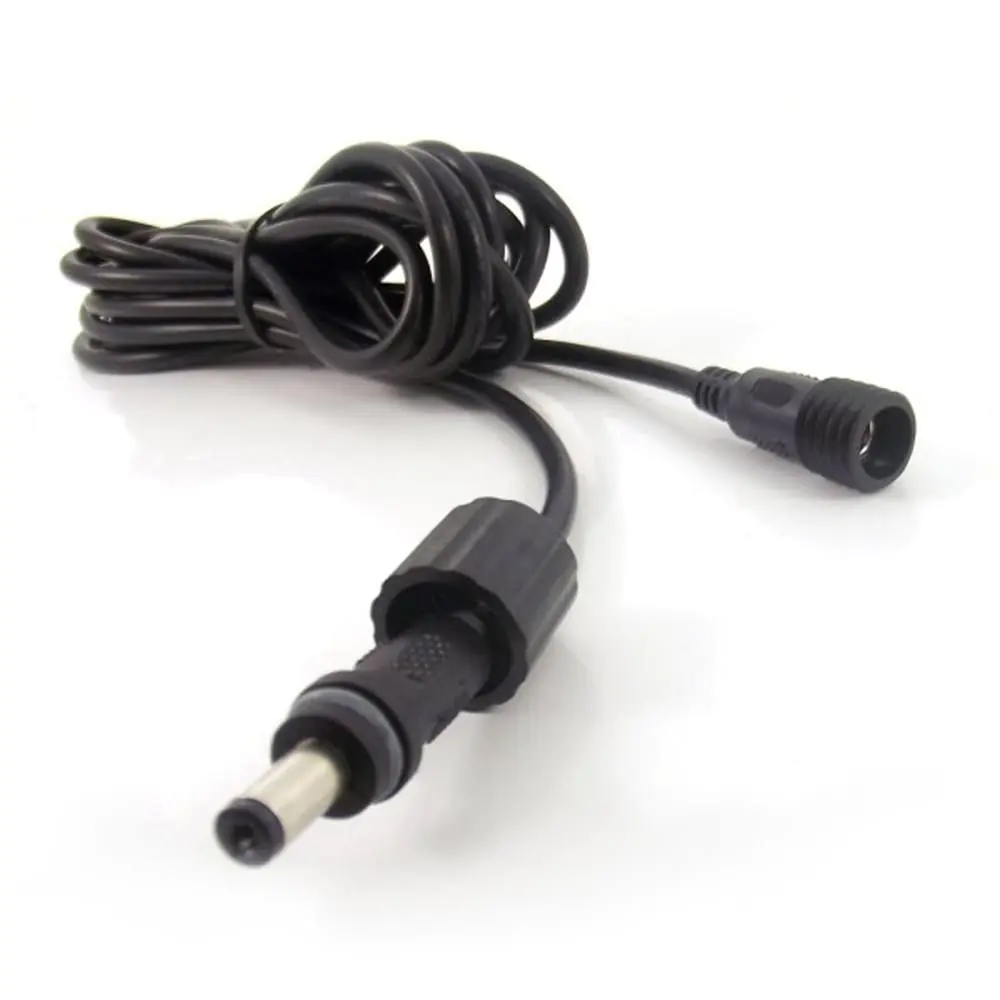
Extension cable for PowerBee and Solarever solar pumps — available in three connector types to match your pump size. Choose DC Barrel for small pumps (SE 360/450/500), 2 Pin for mid-range pumps (SE 700/1000/2000/3500), or 2 Pin Heavy Duty for large pond pumps (SP70/SP80/SPL100). Available in 3m or 5m lengths.
3 connector types — DC Barrel (EC4050), 2 Pin (EC5050), 2 Pin Heavy Duty (EC7050)
Choose 3 metre or 5 metre length
Waterproof connectors on all types
Extends the cable between your solar panel and pump
Use when the panel needs to be positioned further from the water for better sun exposure
Compatible with all PowerBee and Solarever solar fountain systems
Extends the cable between your solar panel (or battery box) and your pump — use it when you need to position the panel further away from the water feature for better sun exposure. Available in three connector types to match your specific pump, and in 3m or 5m lengths.
3 Connector Types3m or 5m LengthWaterproof ConnectorsAll PowerBee & Solarever PumpsFree UK Delivery
Which Connector Type Do You Need?
Check the pump model number on your pump's label (or in your order confirmation), then match it to the correct cable below. If you're not sure, text or call us on 07782 223103 with a photo of your pump and we'll tell you which one you need.
Your solar panel generates DC power and sends it to the pump through a cable. The extension cable simply adds length to that cable — it doesn't change the voltage or current, it just lets you put more distance between the panel and the pump.
Why Different Connector Types?
Small pumps (SE 360/450/500) draw less than 1 amp — a thin DC barrel connector is sufficient
Mid-range pumps (SE 1000/2000/3500) draw up to 2.5 amps — they need a thicker 2-pin waterproof connector to handle the current safely
Large pumps (SP70/SP80/SPL100) draw up to 5 amps — they need heavy-duty 2-pin connectors rated for high current
Using the wrong connector type won't physically fit — the connectors are different sizes, so you can't accidentally use the wrong one
Does Cable Length Affect Performance?
A 3m or 5m extension has negligible effect on pump performance — the voltage drop over that length is minimal
If you chain multiple extensions together (e.g., 10m+), you may notice slightly reduced flow in lower light conditions
For runs over 10m total, contact us for advice — you may need a higher-rated cable
Which connector version matches my existing solar pump and its model number?
Match the connector to the pump model before ordering. EC4050 is for BP320606, BP320607/D/E, BP360608E, AP2-1 and AP3-2. EC5050 is for BP361212E, BP401209/D/E, BP401215/D/E, BP501210/D/E, BP501218/D/E, AP10-1 and AP10-5. EC7050 is for BP801210D/E/F, BP801220D/E/F and BP801830D/E/F. If the model is unclear, compare the connector or send a photo for identification.
What lengths are available, and will adding one affect the pump’s performance?
Each connector version is available in either 3m or 5m. A single 3m or 5m cable is described as having negligible effect on pump performance because voltage drop over that length is minimal. If multiple cables are joined, longer runs may slightly reduce flow in lower light conditions; for total runs over 10m, the product guidance recommends contacting PowerBee about whether a higher-rated cable is needed.
How do I fit the cable between my solar panel and pump without special tools?
No tools are needed. Disconnect the existing panel-to-pump connection, then plug one end into the panel output and the other into the pump input; either end can be used either way. Pull a DC barrel connector straight apart. For 2-pin versions, twist anticlockwise to unlock when disconnecting, then push together and twist clockwise until it clicks. Keep joins out of pooled water and do not cut or splice the cable.
Сonsultation
If you have questions, please ask, do not hesitate,we are always happy to help you