Order by 3:00 PM Monday – Friday to receive your parcel the next day.
Orders placed after 3:00 PM ship the next working day on the same 24‑Hour service and usually arrive the following day.
See Full Delivery Information.
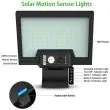
Hybrid Series – Solar Security Light, Hybrid Power
A bright, hybrid-powered solar security light designed for entrances,
paths and security coverage. Charge by solar day-to-day, with USB-C
backup available when sunlight is limited.
✓ 2400 Lumens✓ Hybrid Charging✓ 180° Adjustable Panel✓ 120° Detection✓ 4 Modes✓ IP65 Weatherproof✓ Free 24 Hour UK Delivery On All Orders
The low-profile wedge design directs light downward, making it a great
choice for doorways, side access routes and pathways where you want
clear visibility without glare.
Hybrid power: solar charging with USB-C backup when needed.
Install higher for wider coverage, or lower for concentrated entrance
lighting. The bracket-mounted design also makes it easy to remove the
light for USB-C charging when required.
Intelligent Security Features & Performance
Hybrid Series combines bright output, reliable motion detection and
flexible power options. This makes it especially useful in locations
where winter daylight or shaded walls can affect typical solar lights.
Bright Illumination
Designed for clear visibility around access points.
Up to 2400 lumens output
108 high-efficiency SMD LEDs
Downward-facing LED array
180° illumination angle
Motion Detection
Responsive sensing for practical security coverage.
120° sensing angle
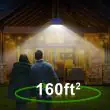
8–10m detection range (approx. 25–30ft)
Automatic night operation
Four selectable lighting modes
Hybrid Power
Designed to keep working when sunlight is limited.
Solar charging for everyday use
USB-C backup charging (cable included)
3200mAh replaceable battery
Day/night sensor operation
Complete Home Protection
For driveways, paths and side entrances, positioning matters.
Mounting higher increases the spread of light and helps create wider
coverage across approach routes.
Thoughtful placement helps create overlapping zones of light.
With a 120° sensing angle and up to 8–10m detection range, this model
is well suited to access routes where you want automatic lighting
without leaving a constant floodlight on all night.
Strategic Installation Options
This design supports two common approaches — concentrated entrance
lighting at lower mounting heights, or wider coverage when mounted
higher.
Lower Mounting
Focused light for close-range visibility.
More concentrated light pattern
Ideal for entrances and doorways
Clear visibility at close range
Great for steps and thresholds
Higher Mounting
Wider spread for driveways and paths.
Broader light dispersion
Supports wider coverage areas
8–10m motion detection range
Suitable for access routes
Flexible Adjustment
Adapt the fit to your wall and sun angle.
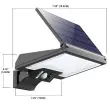
180° rotating solar panel
45° rotating base
Adjustable light coverage
Easy bracket mounting
Advanced Solar Technology & Features
Rotatable panel: 180° adjustment for better charging.
Motion-activated lighting with a wide sensing field.
Replaceable battery in a separate, accessible compartment.
USB-C backup charging helps during low sunlight periods.
Key Product Features
The adjustable panel and hybrid charging give you more control over
performance across different mounting positions and sunlight levels.
Panel Adjustment
Angle the panel towards available sunlight
Useful for shaded or awkward walls
Helps optimise charging through the seasons
Supports varied mounting heights
Performance Overview
Up to 2400 lumens output
108 SMD LEDs
3200mAh replaceable battery
180° illumination angle
Build & Protection
IP65 weatherproof rating
-20°C to 60°C operating range
Robust outdoor housing
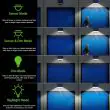
Operating Modes
Dusk-to-dawn constant light
Motion bright + low standby
Motion bright then off
High-brightness floodlight mode
Complete Security Solution
Built for outdoor use with IP65 weather protection, automatic day/night
operation and a replaceable battery design. Hybrid charging provides an
extra layer of reliability when solar conditions are unpredictable.
Installation is quick and straightforward, with no wiring or specialist tools required.
Most customers complete setup in just a few minutes.
Quick Install Summary
Step 1: Choose a Location
Select a sunny outdoor position
Avoid heavy shade where possible
Step 2: Mount the Light
Fix using screws or adhesive pads
No electrical wiring required
Step 3: Switch On & Test
Turn the light on
Test motion detection after dark
or for a longer guide to get the best charging performance and reliable lighting all year.
Correct positioning makes a big difference—especially through autumn and winter, read the following :
Before You Begin
Plan the location, prepare your tools, and install safely.
Location Planning
Face the solar panel south
Avoid shade from trees or buildings
Remember winter sun is lower
Check the mounting surface is solid
North-Facing Tips
Expect reduced winter charging
Use motion-only mode in winter
Angle panel to catch daylight
Keep the panel clean
Tools & Safety
Pencil and spirit level
Suitable screwdriver
Stable platform or ladder
Check for hidden cables
Installation Options
Choose fixings for a permanent mount, or adhesive for a quick setup.
Screw Mount
Mark the mounting points
Pre-drill if needed
Insert wall plugs
Secure bracket firmly
Make It Level
Use a spirit level
Tighten fixings evenly
Check alignment before fitting
Confirm panel faces daylight
Adhesive Mount
Clean the surface well
Ensure it is fully dry
Press firmly into place
Allow adhesive to cure
System Setup & Optimisation
Set the mode and test coverage to match your location and season.
Initial Setup
Remove panel protective film
Select the best mode
Set sensor sensitivity if needed
Test the light at dusk
Position & Aiming
Aim panel for maximum sunlight
Angle light heads as required
Avoid blocked sensor zones
Check for glare on surfaces
Final Checks
Confirm full coverage area
Walk-test the sensor range
Confirm mode behaves correctly
Reposition if charging is poor
Maintenance & Care
Simple upkeep keeps performance strong through every season.
Regular Maintenance
Wipe the panel monthly
Check mounting security
Clear the sensor area
Inspect seals occasionally
Seasonal Adjustments
Summer: choose any mode
Autumn: reduce brightness if needed
Winter: use motion-only mode
Angle panel for low sun
Best Practice
Keep panel free of debris
Avoid installing under eaves
Minimise nearby night lighting
Re-test after storms
Quick Troubleshooting
Try these checks first if the light isn’t performing as expected.
These solar powered lights are designed for easy, reliable outdoor lighting with minimal maintenance. Here’s how they work and what you need to know for best results year-round.
Daytime Charging
Solar panel collects sunlight and charges the internal battery during the day.
For best results, install the panel facing south (in the northern hemisphere), especially in winter when sunlight is limited.
Keep the panel clean and free from shade for maximum efficiency.
Automatic Night Operation
At dusk, the light automatically switches to standby mode.
Built-in motion sensor detects movement and activates the light when needed.
After a set time with no motion, the light returns to standby or turns off to save power.
Selectable Lighting Modes
Most models offer three modes, set by a button on the light or with a remote control:
Mode 1: Motion-activated full brightness, then off — recommended in winter, or if the panel faces north.
Mode 2: Dim light all night, full brightness with motion — works well in spring/autumn with good sunlight exposure.
Mode 3: Constant light (Flood light mode) — best for summer or very high sunlight conditions; may reduce battery runtime in shorter days.
Tip: Adjust mode seasonally for optimal performance and battery life.
Maintenance & Tips
Wipe the panel regularly to remove dust and debris.
Check the light’s position seasonally to ensure good sun exposure.
Test and adjust the motion sensor range if needed.
With correct placement, seasonal mode selection, and occasional cleaning, your lights will provide years of convenient, efficient illumination—no wiring or manual switching required.